Know your maximum offer before you make it.
Enter a property's after-repair value and your rehab estimate. The Deal Analyzer works backward from the profit you require and tells you the most you can pay, then scores the deal against your own standards, so you can say yes, counter, or walk away with numbers instead of a gut feeling.
- Three strategies: flip, wholesale, and BRRRR
- 0-100 deal score that shows its work
- Your own standards, set once
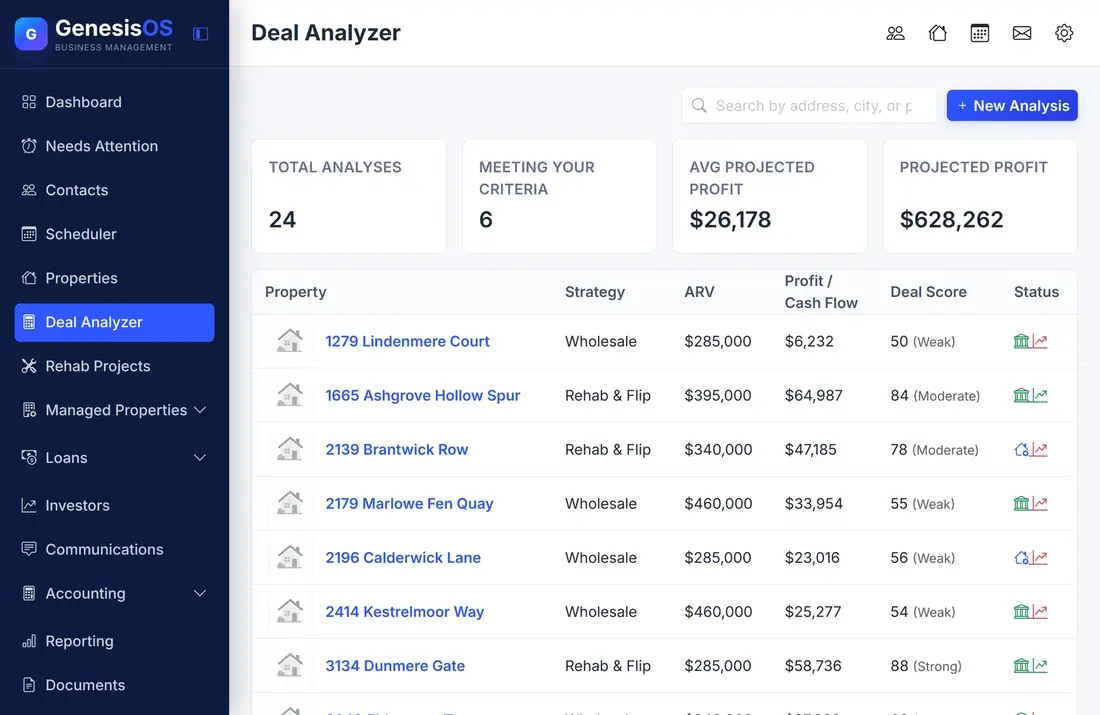
Price every deal with confidence.
Solves for your maximum offer
Tick Profit, ROI, or Margin in the Apply column and the Max Purchase Price row shows the highest price that still meets that standard. With nothing ticked, it shows the price you typed.
Three strategies, one place
Rehab & Flip, Wholesale, and BRRRR each get their own inputs and math. Wholesale splits the margin between you and your end buyer, and BRRRR models rent, expenses, the refinance, and the cash left in the deal.
Your standards, not ours
Set your minimum profit, ROI, margin, rehab-to-ARV limit, cash-on-cash, cap rate, and monthly cash flow once in Settings, along with default cost percentages. Costs pre-fill and every analysis is checked against them.
A score that shows its work
Each deal gets a 0 to 100 score with a plain-English label and a pass or fail icon for every standard. Tick a box to see which standards would still be met at that price.
Compare scenarios side by side
Run the same property as a flip and as a BRRRR, or with a bigger rehab budget, and compare the analyses together before you decide how to approach the deal.
From number to next step
Move each analysis through Draft, Offer Submitted, Under Contract, Closing, and Closed (or Declined). When a deal is a go, start a Rehab Project from it and the original plan is saved for comparison.
A deal summary you can read in seconds
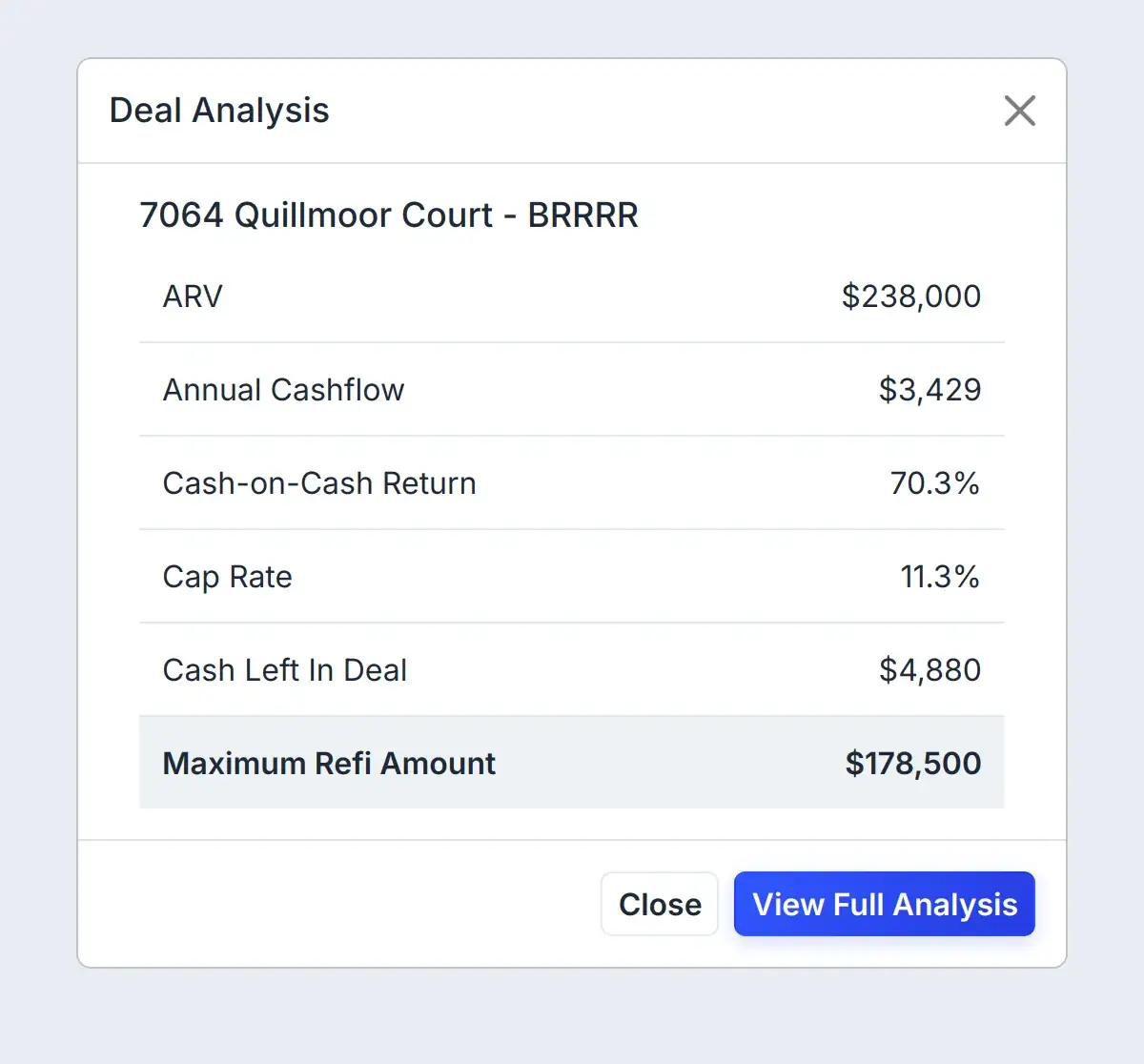
Open any analysis for its headline numbers. This is a BRRRR: what it earns, how it scores against your standards, and how much a refinance could return.
 1234
What the rental earns in a year after expenses and loan payments.
Your yearly cash flow compared with the cash still left in the deal.
The property's income compared with what you paid for it.
The most a refinance can return, based on the value after repairs.
From the first number to a confident decision.
Pick the property
Start from a property you already track, or add a new one. Every analysis lives on a property record.
Choose a strategy and enter the numbers
Enter the after-repair value, your rehab estimate, and your price. Other costs fill in from your defaults and stay editable.
Read the result
See profit, ROI, and margin for flips and wholesale, or cash flow, cash-on-cash, and cap rate for BRRRR, each checked against your standards.
Decide and track it
Compare scenarios, then move the deal through your pipeline and start a rehab project when it is a go.
One property, two ways to buy it
You are looking at a house with an after-repair value of $238,000, and your contractor estimates $31,000 of work.
As a flip, the Deal Analyzer fills in selling, holding, and financing costs from your defaults and solves for the most you can pay. As a BRRRR with a $150,000 purchase and $2,100 of monthly rent, it shows the cash flow, the refinance, and how much cash stays in the deal.
Sample figures. The BRRRR case assumes a 75% refinance at 6.5% over 30 years, $198 of monthly taxes, $110 of insurance, and 5% each for management, maintenance, and vacancy. Your own standards come from Settings.
Connected to the rest of your operation.
Good to know.
Need a module we don’t have?
GenesisOS is modular, so we can build one just for you.
Run your business from one connected system.
Replace disconnected handoffs with shared records, purpose-built modules, and workflows that move the work forward.